For operations teams, agencies and CRM consultants

Remove exact duplicates. Keep a record of every removal.

A contact export is easy to damage when you cannot see what was removed. Choose the identifying columns, keep blank-key records protected, and export the clean file alongside a removal audit.

Try the working toolSee the offers

Browser-local software. No runtime subscription. Source license: $99 USD once.

See the actual tool

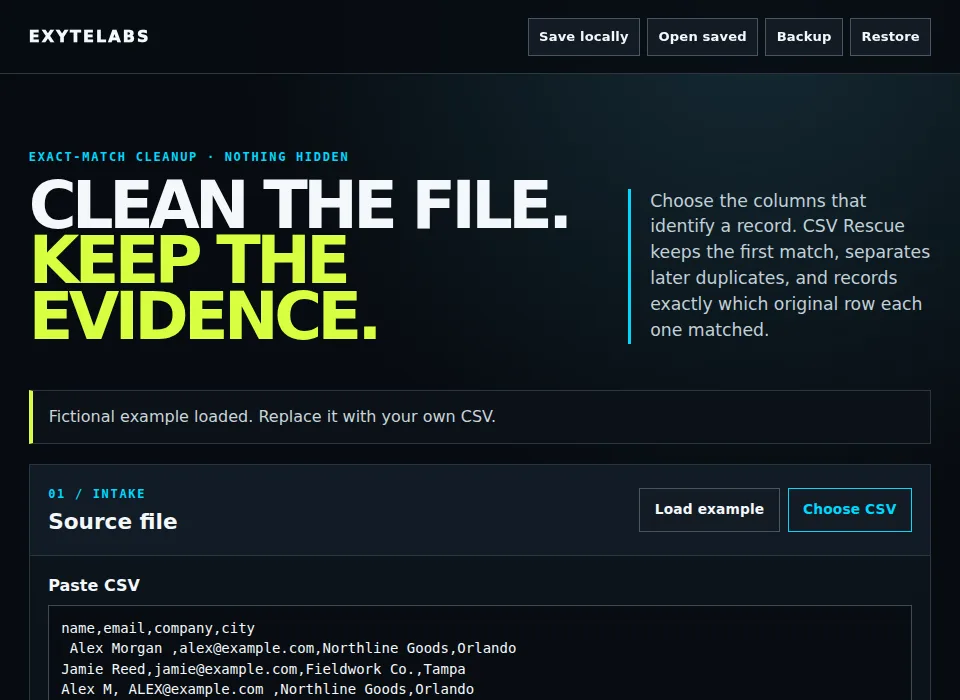
CSV Rescue working interface

Six fictional contact rows become five retained rows and one documented duplicate. Two rows without an email stay protected. The audit identifies both the removed row and its retained match. Fictional demonstration; no customer result or savings claim.

  1. Paste or select a CSV with a header row.
  2. Choose one or several identifying columns and cleanup rules.
  3. Export the clean CSV and the separate duplicate audit.

Own the editable source

$99 USD / one-time

Complete editable source, sample inputs, setup and rebranding guide, transfer inventory, tests and known limitations. A nonexclusive license to modify, rebrand and commercially operate one deployment. No source redistribution or exclusivity.

Includes 14 days of delivered-source defect fixes. Custom changes and setup work are quoted separately. You provide hosting and any domain; provider fees may apply.

Request the $99 source handoff

Email purchase request. We confirm the terms and payment method before payment. The source ZIP is delivered manually after payment is confirmed; no instant checkout or download is available yet.

CSV duplicate cleanup — done for you

$149 USD / fixed scope

One CSV within the tool limits. Agreed key columns, edge-space cleanup, optional repeated-space cleanup and exact duplicate removal. Delivery: clean CSV, duplicate audit and review summary. One revision to the agreed rules.

Tell us the row count, identifying columns and desired cleanup rules. Send a redacted sample first; do not email the full customer file. We agree the scope and a secure transfer method before payment or data transfer.

Target turnaround: two business days after scope, payment and usable inputs are confirmed. We confirm availability before accepting payment.

Request this service

Scope enquiry first. No payment is taken on this page.
Before you choose

What are the limits?

Up to 2,000 data rows, 100 columns and a 1 MB CSV. Exact matching only. No fuzzy matching, field merging, email validation, CRM connection or inferred repairs.

Why buy when I can use the demo?

The public demo lets you evaluate and use the tool. The purchase is for editable source and the stated commercial operation and rebranding rights. It does not unlock extra features. If you only need to try the tool, start with the demo.

Do I need technical skills?

For the source license, yes: you or your developer must follow the included setup and hosting instructions. This is browser software, not a native installer. Ask about setup before paying if you need help.

Where does my data go?

The DIY tool processes data in your browser. Optional local saves and exported backups are unencrypted. Keep originals and avoid unnecessary sensitive data. Service work uses a separately agreed transfer method; do not send full customer files with your first enquiry.

Is this tested?

Core examples and product-specific failure cases were checked again on October 2, 2026. Existing release records include Chromium journeys. This cycle did not recheck physical devices, Safari, Firefox, or a paid purchase and delivery.

What if it is unsuitable?

Try the complete demo and confirm the scope before payment. The source includes 14-day delivered-source defect fixes. Any refund terms must be confirmed in writing before payment; this page makes no additional refund promise.